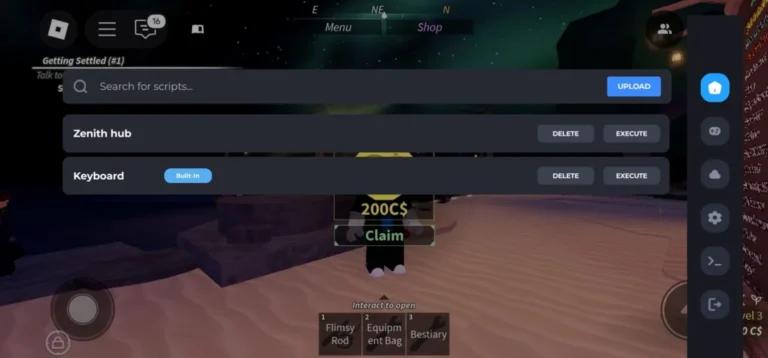
The Forge Script
The Forge Script is a Roblox Lua-based automation tool created for players who enjoy playing The Forge (Beta). It includes features such as auto mining, instant purchasing, automated farming, and auto combat, all designed to make gameplay faster and more convenient.
Built to enhance efficiency, this script offers advanced automation options like instant forging, continuous resource collection, and kill aura functionality. These tools help reduce repetitive tasks and create a smoother experience across both PC and mobile platforms, allowing players to focus more on progression and strategy rather than constant grinding.

Table of Contents
What Is The Forge Script?
The Forge Script is a third-party Lua-based automation tool created for players of Roblox’s The Forge. The game heavily relies on grinding—mining rare ores, crafting custom equipment, and fighting hostile mobs—which can quickly become repetitive and time-consuming. To reduce this workload, many players turn to automation tools that handle these tasks for them.
This Forge Roblox script automates key gameplay actions such as mining, forging, and combat, allowing players to progress faster with less manual effort. It includes a well-designed graphical interface that helps manage resources, handle zombie encounters, and streamline overall gameplay. Due to its ease of use and keyless access, it is often regarded as one of the more popular scripts available in 2025.
Copy Latest The Forge Script
1. FourHub – Auto Mine, Auto Farm Enemy, Teleport
loadstring(game:HttpGet("https://raw.githubusercontent.com/jokerbiel13/FourHub/refs/heads/main/TheForgeFH.lua",true))()2. Voidware Pastebin
loadstring(game:HttpGet("https://pastefy.app/sUvho2d7/raw"))()3. Lumin Hub
loadstring(game:HttpGet("https://api.luarmor.net/files/v3/loaders/6f9e8a4664c53863bafc2e0c13e69e47.lua"))()4. Speed Hub
loadstring(game:HttpGet("https://raw.githubusercontent.com/AhmadV99/Speed-Hub-X/main/Speed%20Hub%20X.lua", true))()5. Rift Hub
loadstring(game:HttpGet("https://rifton.top/loader.lua"))()6. Zenith Hub
loadstring(game:HttpGet("https://zenithhub.cloud/panel/script"))()7. PepeHook NO KEY Roblox
--[[

yes no key system at the moment & for free.
Mobile Supported
Halfy Xeno & Solara Supported

Discord: https://discord.gg/pepehook
--]]
loadstring(game:HttpGet("https://raw.githubusercontent.com/GiftStein1/pepehook-loader/refs/heads/main/loader.lua"))()
8. Lunor Hub
loadstring(game:HttpGet("https://lunor.dev/loader"))()9. Axiom Hub
loadstring(game:HttpGet("https://api.luarmor.net/files/v3/loaders/281e3549d77ad146fff9e409722b6140.lua"))()10. Bonk Hub
loadstring(game:HttpGet("https://bonkhub.online/loader.lua",true))()11. UB Hub
loadstring(game:HttpGet("https://raw.githubusercontent.com/TeamUBHub/UBLoader/refs/heads/main/index/Key.lua"))()12. Black Hub
loadstring(game:HttpGet("https://raw.githubusercontent.com/Skibidiking123/Fisch1/refs/heads/main/FischMain"))()13. Lazy Hub
getgenv().mobileMode = false -- set true if ur on mobile device
repeat wait() until game:IsLoaded()
loadstring(game:HttpGet("https://raw.githubusercontent.com/LioK251/RbScripts/refs/heads/main/lazyuhub_theforge.lua"))()
14. Mirage Hub Script (NO KEY!) – Dupe, Instant Mine, Fast Gold, Auto Farm and More
loadstring(game:HttpGet("https://api.luarmor.net/files/v3/loaders/2075c39b9a5a2e4414c59c93fe8a5f06.lua"))()15. Dupe Script – Auto Farm Mode, Auto Attack, Instant Forge
loadstring(game:HttpGet("https://raw.githubusercontent.com/GiftStein1/pepehook-loader/refs/heads/main/loader.lua"))()16. Simca Hub – Auto Mining, Instant Forge, Quests
loadstring(game:HttpGet("https://raw.githubusercontent.com/notmydaisy/simca/main/games/the-forge"))()17. Best Keyless OP Script
loadstring(game:HttpGet("https://pastefy.app/DfumnMOa/raw"))()18. No 1 Hub
loadstring(game:HttpGet("https://raw.githubusercontent.com/SkibidiHub111/Forge/refs/heads/main/No1Dev"))()19. The Forge Script – Instant Forge, Instant Kill, Auto Farm, Ore Spawner
loadstring(game:HttpGet("https://lunor.dev/loader"))()20. Solix Hub
loadstring(game:HttpGet("https://pastefy.app/tWslZUaE/raw"))()21. Haze Hub
loadstring(game:HttpGet("https://haze.wtf/api/script"))()22. The Forge Hack/Script – Auto Mining, Instant Forge, GodMode
loadstring(game:HttpGet("https://pastefy.app/RpcM27HB/raw"))()23. The Forge Hack/Script – Auto Mining, Instant Forge, GodMode
loadstring(game:HttpGet("https://pastefy.app/RpcM27HB/raw"))()24. Chiyo Hub
loadstring(game:HttpGet("https://raw.githubusercontent.com/kaisenlmao/loader/refs/heads/main/chiyo.lua"))()25. Instant Fast Mine Fast Fight Free Rewards And More
loadstring(game:HttpGet("https://gist.github.com/CodeCrucial/04d3d699bc13894df0d98c7cdce407d3/raw/gistfile1.txt"))()26. ATG Hub
loadstring(game:HttpGet('https://raw.githubusercontent.com/ATGFAIL/ATGHub/main/The-Forge.lua'))()27. NS Hub
loadstring(game:HttpGet("https://raw.githubusercontent.com/OhhMyGehlee/sh/refs/heads/main/a"))()28. Legend Hub
loadstring(game:HttpGet("https://pastefy.app/ULaWpxKm/raw"))()29. The Forge [BETA] Script – Auto Fast Mine, Auto Fight, Instant Buy, Keyless
loadstring(game:HttpGet("https://airflowscript.com/loader"))()Features of The Forge Script
This powerful script offers a wide range of automation and quality-of-life features designed to improve efficiency in The Forge.
Auto Mining & Resource Collection
- Automatically mines ores without manual input
- Advanced auto-farm system for continuous resource gathering
- Auto-attack support for handling zombies and hostile mobs
- ESP (Extra Sensory Perception) to locate valuable ores and enemies more easily
Instant Actions & Teleportation
- Instant forging for faster crafting
- Automatic purchasing of tools, upgrades, and essential items
- Teleportation across the map for quicker movement
- Direct teleport to specific mining zones for rare materials
Combat & Defense Systems
- Kill aura for automated enemy elimination
- Auto zombie handling to manage undead threats
- God mode option for increased survivability (use cautiously)
- Continuous auto-attack functionality during combat
Automation & Quality-of-Life Enhancements
- User-friendly GUI to control mining, crafting, and combat automation
- Keyless execution with no script key requirements
- Compatible with both PC and mobile devices
- Automatic selling of unwanted items to manage inventory
- Auto-roll features for gear upgrades and loot optimization
Additional Script Capabilities
- Infinite resource-related exploit features
- Designed to operate discreetly to reduce detection risks
- Regular updates from the developer community
- Access to beta features for testing new automation options

How to Use The Forge Script
Follow the steps below to set up and run The Forge Script correctly:
Step 1: Select a Compatible Executor
Start by installing a reliable Roblox Delta executor that supports Lua script execution. Many executors work on both PC and mobile, but compatibility can vary, so make sure the one you choose supports The Forge properly.
Step 2: Obtain The Forge Script
Copy the script code from a trusted source, such as the official website or a verified paste link. Always double-check the source before downloading or copying anything, as unofficial uploads may contain harmful files.
Step 3: Set Up the Executor
Open your executor and ensure it is ready for script execution. Confirm that it’s correctly configured and prepared to inject scripts into The Forge without errors.
Step 4: Launch The Forge Game
Open Roblox and start The Forge game. Once the game is running, attach or inject the executor into the game process. Wait until the executor confirms a successful connection.
Step 5: Run the Script
Paste the script into the executor’s input box and execute it. After running the script, a control panel or interface should appear. From there, you can enable features such as auto farm, auto mining, or combat automation, which will activate immediately.
Script Safety & Best Practices
Although automation tools can offer noticeable advantages, it’s important to understand the risks that come with using them. Keeping the following points in mind can help reduce potential issues:
Source Verification
Only obtain scripts from well-known and trusted sources. Avoid unfamiliar third-party websites, reuploads, or shortened links, as these are commonly used to distribute harmful files.
Account Security
Using scripts goes against Roblox’s Terms of Service. This means there is always a possibility of warnings, temporary suspensions, or permanent account bans. Never use automation tools on your main account if you value long-term progress and purchases.
Executor Reliability
Always choose a reputable Roblox executor with a strong track record. A good executor should protect user privacy and remain free from malware, spyware, or intrusive ads.
Community References
Trusted forums and established YouTube creators often review and demonstrate working scripts. Searching for reliable content related to The Forge script can help you identify safer options and avoid fake releases.
Keeping Scripts Updated
Outdated scripts are more likely to break or be detected. Make sure you’re using the latest version to maintain stability and reduce compatibility issues.
Platform Compatibility
PC Support
On PC, The Forge Script performs reliably with most popular executors. Desktop users typically gain full access to features such as auto forging, instant teleportation, ESP, and advanced automation systems.
Mobile Support
Mobile players can also use the script, though functionality may vary depending on the executor. Android devices usually provide better compatibility, while iOS is more restricted due to tighter security controls. Several keyless script options are available for mobile users who want a simpler setup.
Frequently Asked Questions
Is The Forge Script safe to use?
Safety largely depends on where the script is obtained. Always use trusted sources and well-known executors. Before running any script, scan files for potential threats and never enter your Roblox login details on third-party websites.
Can using this script lead to a ban?
Yes. Running scripts violates Roblox’s Terms of Service and can result in penalties ranging from temporary suspensions to permanent account bans. Since the features offered bypass normal gameplay rules, they should be used with full awareness of the risks involved.
Does The Forge Script work on mobile devices?
The script generally functions on Android devices when paired with compatible executors. Support on iOS is more limited due to stricter security measures. Mobile users should always confirm executor compatibility before attempting to run the script.
Are these scripts free to use?
Most Forge automation scripts are available at no cost. However, certain executors may require a paid license or subscription. Keyless versions are popular because they remove the need for verification keys or repeated authentication.
What should I do if the script stops working?
Scripts can stop functioning after game updates or changes to The Forge. When this happens, check trusted script repositories or community forums for updated versions. In most cases, the developer community releases fixes shortly after major updates.
Conclusion
The Forge Script is a powerful automation tool for players looking to progress faster and minimize repetitive grinding in The Forge. With features like auto farming, auto mining, kill aura, instant forging, teleportation, ESP, and defensive enhancements, it significantly streamlines gameplay and reduces manual effort.
Its keyless design and support for both PC and mobile platforms make it one of the more popular automation options within the Roblox scripting community in 2025. Whether you’re collecting rare ores, crafting specialized gear, or surviving waves of enemies, the script simplifies nearly every aspect of the experience.
That said, responsible use is crucial. Always rely on secure executors, download scripts only from trusted sources, and remain aware of the risks involved. Third-party tools can lead to account penalties if misused.
When approached cautiously, The Forge Script can turn long hours of grinding into a more efficient experience. Just be sure to balance convenience with security, and always protect your account when experimenting with automation in the Roblox ecosystem.